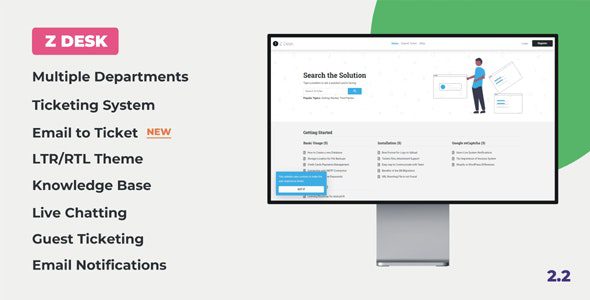
Here’s a detailed, **up-to-date overview of *Z Desk 2.2 – Support Tickets System with Knowledge Base and FAQs***, a comprehensive customer support platform script you can deploy on your own server: ([WeaDown][1])
—
## 📌 What It Is
**Z Desk 2.2** is a **self-hosted support ticketing system** with built-in **knowledge base** and **FAQs management** designed for businesses, SaaS platforms, online marketplaces, and any organization that needs a **robust help desk solution**. It combines ticket support, live chat, self-service articles, and built-in FAQs into one complete support ecosystem. ([WeaDown][1])
The system is typically sold as a **PHP script (CodeIgniter 3)** that you host on your own Linux/PHP server. It’s modular, multi-department capable, and suitable for both small help desks and larger customer support operations. ([jamesrmoro.me][2])
—
## 🧠 Core Features
### 🎫 Ticketing & Support Workflow
* Full **support ticket system** with creation, assignment, and tracking. ([jamesrmoro.me][2])
* **Guest ticketing** (guests can open tickets without registration). ([jamesrmoro.me][2])
* **Live chat** for registered users to interact with agents in real time. ([jamesrmoro.me][2])
* **Email-to-ticket (email piping)** – convert incoming support emails directly into tickets. ([jamesrmoro.me][2])
* **Auto-close tickets**, **feedback collection**, **ticket notes with attachments**, and **PDF reporting**. ([jamesrmoro.me][2])
* **Assign tickets to agents**, **change ticket priority/department**, and **canned replies** for faster support. ([jamesrmoro.me][2])
### 📚 Knowledge Base & FAQs
* Integrated **knowledge base** to publish help articles for self-service support. ([WeaDown][1])
* **FAQ management** module so you can list frequently asked questions with searchable content. ([WeaDown][1])
* Option to **restrict articles and FAQs to logged-in users only**. ([jamesrmoro.me][2])
* **Voting on articles** (helpful / not helpful) and **social media sharing** for public content. ([jamesrmoro.me][2])
### 👥 User & Role Management
* **Unlimited user roles and staff members** with flexible permissions. ([WeaDown][1])
* **User registration/login** with username/email and **social login** support (e.g., Facebook, Google, Twitter). ([jamesrmoro.me][2])
* **Two-Factor Authentication (2FA)** via email for added account security. ([jamesrmoro.me][2])
* User lists, filters, **timezone adjustment per user**, and password strength settings. ([jamesrmoro.me][2])
### 📊 Admin & Notifications
* **Dashboard with statistics and reports** to monitor tickets and performance. ([WeaDown][1])
* **Email and website notifications** for ticket updates, replies, and assignments. ([jamesrmoro.me][2])
* **Custom fields**, **backup options**, **cookie consent popup**, **maintenance mode**, and more. ([jamesrmoro.me][2])
* Translate the interface (it’s **translation ready**) and choose **LTR or RTL layout**. ([jamesrmoro.me][2])
### 🔐 Security & Tech
* Built on **CodeIgniter 3** and uses **Bootstrap 5** for a responsive UI. ([jamesrmoro.me][2])
* Security protections against **XSS, SQL Injection, and CSRF**. ([jamesrmoro.me][2])
* Supports **PHP 7.2+ up to PHP 8.5**, MySQL database, SMTP email, IMAP for email piping, and essential extensions like cURL, mbstring, GD, and ZipArchive. ([jamesrmoro.me][2])
—
## 📈 Typical Use Cases
**Z Desk** is suited for:
* Businesses and startups needing a **centralized support ticketing platform**. ([jamesrmoro.me][2])
* SaaS and digital product companies managing buyer support. ([jamesrmoro.me][2])
* Online marketplaces with agents and departments handling support. ([jamesrmoro.me][2])
* Customer service teams that want a **knowledge base + live chat + ticket** system in one solution. ([WeaDown][1])
—
## 🛠 Installation & Deployment
Z Desk includes an **easy installation wizard** that guides you through database setup and configuration. Once installed, you’ll access an admin dashboard where you can:
* Create support **departments and agents**. ([jamesrmoro.me][2])
* Set up email piping and SMTP. ([jamesrmoro.me][2])
* Configure knowledge base and FAQ categories. ([WeaDown][1])
It’s meant to run on standard Linux/PHP hosting with a MySQL database and common PHP extensions. ([jamesrmoro.me][2])
—
## 📌 Summary
**Z Desk 2.2 – Support Tickets System with Knowledge Base and FAQs** is a **full-featured help desk script** that combines ticket management, live chat, a searchable knowledge base, and FAQ modules into a scalable support system. It offers robust **user roles, email piping, reporting, security features**, and customizable options — making it useful for businesses, SaaS providers, and any customer support operation needing a self-hosted support ecosystem. ([jamesrmoro.me][2])
—
If you want, I can also break down **how Z Desk compares to SaaS help desk platforms** (like Zoho Desk or Freshdesk) from a feature and cost perspective! Let me know.
[1]: https://weadown.com/res/z-desk-support-tickets-system/?utm_source=chatgpt.com “Z Desk 2.2 – Support Tickets System with Knowledge Base and FAQs – WeaDown”
[2]: https://jamesrmoro.me/product/z-desk-support-tickets-system-with-knowledge-base-and-faqs/?utm_source=chatgpt.com “Z Desk – Support Tickets System with Knowledge Base and FAQs – | Product Reviews and Ratings”
